
Remote Bingo Information
Enjoy the convenience of playing bingo from home while staying fully connected to the live action at our hall. For each session you are assigned your own dedicated physical bingo computer located on-site, just as if you were seated here in person. That device plays your cards in real time and is used exclusively to represent you by proxy during the session.
You will receive a unique serial number that lets you securely log in and view the bingo cards assigned to your computer at the hall, so you can follow every moment of the game as it happens. You can view your cards on a smart phone, tablet, laptop, PC, smart TV or anything with an Internet browser, and you can watch video of the game live as it is played. If you would also like to chat with other players during the game, you can follow along on our Facebook Live page.
The ability to do all of this remotely is offered only as a convenience and entertainment. All game play and outcomes are determined and verified at the bingo hall by the proxy bingo computers.
Step 1 – How Do I Get Started?
Go to https://coldtreebingo.com/ to learn about our Remote Bingo game. The home page will usually have news updates on upcoming games and previously played game results.
Step 2 – Account Registration
Click on the ACCOUNT tab or go directly to https://coldtreebingo.com/account/ to register an account or login to your existing account. After registering your account you will receive an e-mail that will allow you to set your password.
Step 3 – Donate / Play in Order to Attend the Next Game
Click on the DONATE / PLAY tab or go directly to https://coldtreebingo.com/donate/ to make a donation that will allow you to play in our next Remote Bingo game.
Two Ways to Play – Choose What Suits You
Once you have donated for a session there are two ways to follow the game. Both use the same bingo cards and the same live broadcast. The only difference is whether you want the Facebook chat.
Option 1 – Everything on One Screen (easiest)
About 30 minutes before game time we email you your card number and a personal link. Click that link and your bingo cards appear right beside the live game on a single screen, already signed in. There is nothing to look up and nothing to type. It works on a phone, tablet or computer.
Please note: this combined view does not include the Facebook chat. If chatting with the other players is part of the fun for you, use Option 2.

Option 2 – Two Tabs, With the Facebook Chat
This is the original way to play and it is still fully supported. You look up your serial number, open your bingo cards in one tab, and watch the live game on Facebook in another tab or on a second device — that is where the chat is.
The steps below walk you through this option.
Option 2, Step 1 – Get Your Login Information
On the day of the game, perhaps about 30 to 45 minutes before the start of the game you will need to click on the spreadsheet tab at the top bar of this website or go to www.getbingocards.com/coldtree to see a list of the players who are scheduled to attend the next game. Make sure you are looking at the ASSIGNED COMPUTERS tab. Once the game is ready to be played you will see that the list of players will have been placed into alphabetical order for ease in locating your name. Once you locate your name you will see a column where a SERIAL NUMBER has been assigned to you. That is your PIN or login code for attending the game remotely.
Option 2, Step 2 – Login to Your Game
Once the serial number has been assigned you will need to then navigate to http://www.watchyourbingo.com/coldtree or http://138.59.16.36/rlogin.aspx to get to the login page.
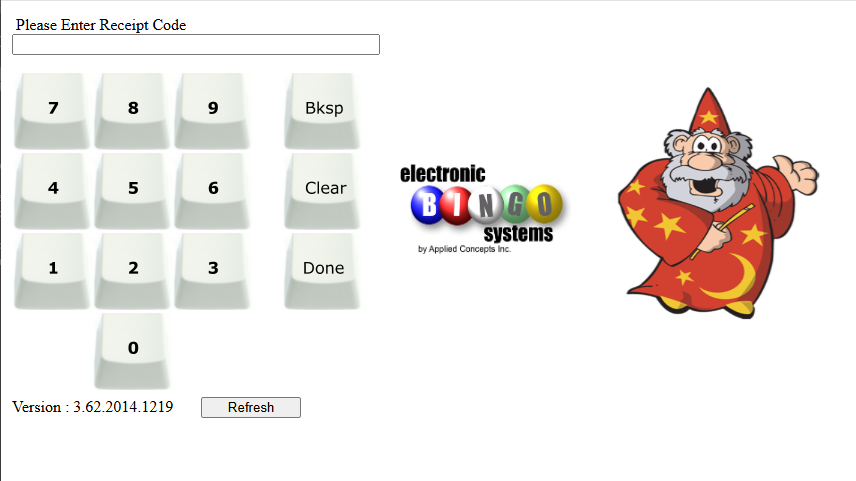
Enter your assigned Serial Number login code using the keypad on the screen and click on DONE when completed.
Once there you should see something like the following screen.
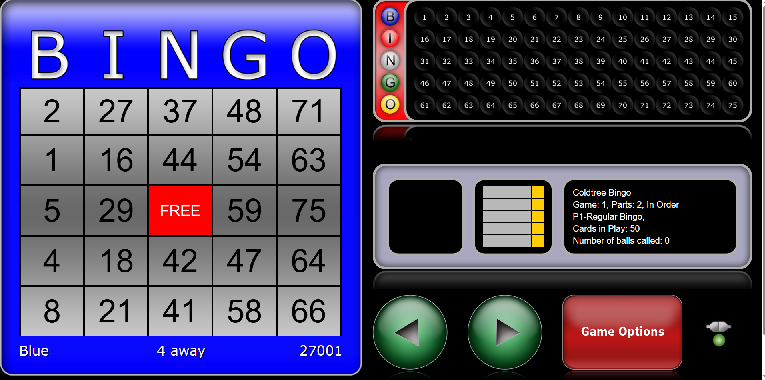
Option 2, Step 3 – Watching the Bingo Hall
Using another device go to our Facebook Live page to watch video of the game in real time at https://www.facebook.com/ColdTreeFoundationBingo/live_videos and you will see the balls being drawn with verification of the proxy computers being done.